
1-click dialer
Call and WhatsApp from any lead—one tap.
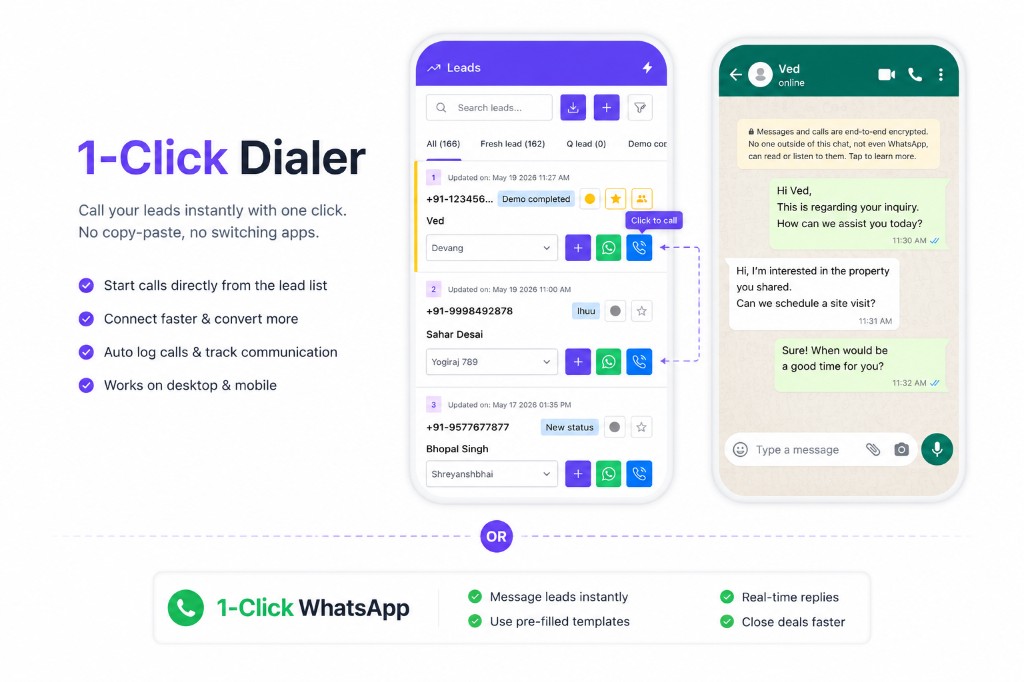
Dial clients from the CRM on web or mobile—no copy-paste. Calls log on the timeline; WhatsApp opens with the same number ready for a quick follow-up.
- Web CRM
- Mobile app
- Auto call log
- 1-tap WhatsApp
Use cases
1-click dialer on web and mobile
Office teams and field reps use the same workflow—call from the lead, then open WhatsApp when you need to share details.
Web CRM
Power through callbacks from your desk
- Phone icon on every lead row and client profile
- Run calling blocks without switching to contacts or Excel
- Open WhatsApp for the same lead without retyping the number
- Calls log on the timeline while you work in the browser
Mobile app
Follow up between site visits and on the road
- Tap to call from the mobile lead list or card
- Opens your phone dialer with the client number filled in
- Jump to WhatsApp right after the call to share a brochure or slot
- Same lead record—whether you called from web or phone
Call & WhatsApp workflow
Call. Log. Message. Same lead.
Reps call from the lead list, the conversation is recorded automatically, then one tap opens WhatsApp to send project details, visit slots, or a quick follow-up.
Step 1
Tap call on the lead
Hit the phone icon on web or mobile—the client number is ready to dial.
Step 2
Talk—call logs on the timeline
Incoming or outgoing calls attach to the lead with duration, time, and staff name.
Step 3
Tap WhatsApp to follow up
Send brochures, visit confirmations, or a quick “thanks for your time” without leaving CRM.
What you get
Caller, WhatsApp, and logging in one place
Built for how brokers actually work—call first, message second, everything on the client record.
1-click dialer
Call straight from the lead list or profile—built for callback lists and daily calling blocks.
1-click WhatsApp
Open WhatsApp with the client number and context ready—no copy-paste between apps.
Automatic call logging
Every call lands on the lead timeline—duration, direction, and who called—without manual entry.
Works on web
Desktop CRM for office teams running through fresh leads, callbacks, and hot inquiries.
Works on mobile
Field reps and site-visit teams call and message from the same app they use for lead updates.
Call then WhatsApp
Natural handoff after a call—share floor plans, pricing, or a site visit link in seconds.
Key benefits
Why teams switch to 1-click dialer
- No more copying numbers from CRM into the phone dialer
- Reps message on WhatsApp without hunting for the client chat
- Owners see who called and who only messaged—on the same lead
- Calling blocks run faster when every lead has call + WhatsApp in one row
- New joiners follow the same workflow on web and mobile from day one
- Pairs with call reporting for talk time and missed-call tracking
See 1-click dialer on web and mobile
Book a short demo—we’ll show calling from the lead list, WhatsApp handoff, and how every action stays on the client record.