On this page
On the Excel vs CRM real estate question, Excel works for a solo broker with a small, steady lead list. A CRM becomes necessary once several people share leads, enquiries arrive from portals and ads, and follow-ups start slipping. The switch point is mostly about people and lead sources, not just the number of rows.
This guide is for brokers and agency owners in India who run their business on a Google Sheet or Excel file today and are wondering whether a CRM is worth the change. It compares both honestly, gives a "switch when" checklist, and lays out the migration steps.
Excel is fine for a solo broker with a small, stable lead list. Once several agents share leads from portals and ads and follow-ups start slipping, a CRM pays for itself by keeping every lead owned, reminded and recorded.
- Excel suits one person; it breaks when several agents share live leads.
- Switch when follow-ups slip, sources multiply or agents leave with data.
- Clean and map your sheet before importing, not after.
- Assign an owner and next follow-up date to every imported lead.
Where Excel still works well
Excel and Google Sheets deserve credit. Most Indian brokerages started on one, and for some it is still enough.
A spreadsheet works when:
- One person handles all leads and calls.
- Leads come from a few sources, such as referrals and one portal.
- Active leads fit on a screen or two.
- You do not need to know who called whom, or when.
In that situation, a clean sheet with columns for name, phone, requirement, budget, status and next follow-up date is a perfectly good system.
Excel vs CRM: 8 criteria compared
The gaps show up as soon as a team forms and leads start arriving from many places at once.
| Criterion | Excel or Google Sheets | Real estate CRM |
|---|---|---|
| Lead capture | Manual copy from portals, Meta and WhatsApp | Leads arrive automatically from connected sources, with source attached |
| Assignment | Someone types a name in a column | Auto-assigned by rules the moment the lead arrives |
| Follow-up reminders | Agent has to remember or filter the sheet | Alerts on phone and web for each next follow-up |
| Call and WhatsApp history | Notes typed by hand, if at all | Calls and chats saved on the lead timeline |
| Multiple users | Edits clash; anyone can delete or copy everything | Each user sees what their role allows |
| Reports | Built manually with filters and pivots | Leads by source, pipeline and staff activity, ready daily |
| Mobile use in the field | Hard to update a sheet during a site visit | Mobile app with one-tap call, WhatsApp and updates |
| Data when an agent leaves | History often sits in their phone and personal WhatsApp | History stays on the lead; reassign in a few clicks |
Excel wins on two points: it costs nothing extra and everyone already knows it. Those are real advantages, which is why the decision should depend on whether the gaps above are costing you deals.
Want to see this on your own leads? Book a free Antoc demo.
The hidden cost of staying on Excel
Excel feels free because there is no invoice. The cost shows up as leads you paid for and never worked.
Illustrative example (₹): a 6-agent brokerage in Mumbai spends ₹87,500 a month on portal packages and Meta ads and gets 250 leads, so each lead costs ₹350.
Suppose 30 leads a month fall through the cracks because nobody updated the sheet or set a next date. That is ₹10,500 of lead spend wasted every month, or ₹1,26,000 a year.
Now suppose just one of those leads was a buyer for a ₹1.5 crore flat and your brokerage is 1%. The missed commission is ₹1,50,000 from a single deal.
Compare that with a CRM. On Antoc, 6 users on the Basic plan cost 6 × ₹599 = ₹3,594 a month on annual billing, or 6 × ₹699 = ₹4,194 a month on Prime, which adds automated lead capture. For the full breakdown, see our guide to real estate CRM pricing in India.
Switch when: a quick checklist
If two or more of these are true, it is time to move off Excel:
- More than two people call or WhatsApp leads from the same list.
- Leads come from three or more sources: portals, Meta ads, website, walk-ins, channel partners.
- Someone spends time every day copying leads into the sheet.
- You have found leads with no call logged days after they arrived.
- Two agents have called the same buyer without knowing it.
- An agent left and buyer history left with them.
- You cannot answer "which source gave us site visits last month?" in under five minutes.
- The sheet has multiple versions on different laptops or phones.
If none apply, keep Excel and revisit in six months. If several apply, our post on why Excel breaks after 200 leads shows what usually happens next.
How to migrate from Excel to a CRM
Most migrations go wrong because messy data is imported as-is. Spend an afternoon on the first two steps and the rest goes quickly.
Step 1: Clean the sheet
Work on a copy of the file, not the original.
- Remove duplicate rows, matching on phone number.
- Format all phone numbers the same way, with country code.
- Delete test entries, blank rows and contacts that are clearly not buyers.
- Standardise status values; "Hot", "hot lead" and "HOT!!" should all become one value.
- Split combined fields, such as "2BHK / 80L / Andheri", into separate columns for BHK, budget and location.
- Mark closed and long-dead leads so they can be imported as lost or skipped.
Step 2: Map columns to CRM fields
Write down where each Excel column will go. Ask your CRM vendor for its import template, and match your columns to it.
| Excel column | CRM field | Note |
|---|---|---|
| Client Name | Lead name | One name per row |
| Mobile | Phone | Same format for all rows |
| Source | Lead source | Use the CRM's source names, such as 99acres or Meta |
| Requirement | BHK, budget, location | Separate fields, not one text blob |
| Status | Pipeline stage | Map each old status to one stage |
| Agent | Assigned to | Must match user names in the CRM |
| Next Call | Follow-up date | Valid date format |
Step 3: Import a test batch, then the rest
Import 20 to 30 rows first. Open a few leads in the CRM and check that names, numbers, stages and dates landed in the right fields. Fix the mapping, then import the full file. Ask the vendor's onboarding team if you are unsure how their import works.
Step 4: Assign owners and next dates
Every imported lead needs an owner and a next follow-up date. Without them, the CRM becomes a nicer-looking version of the same forgotten list. Run a filter for "no owner" and "no follow-up date" and clear it to zero before going live.
After that, connect your live lead sources so new enquiries arrive directly in the CRM, and stop updating the sheet after one week.
What to look for in your first CRM
If this is your first move off a spreadsheet, keep the shortlist simple. You need fewer features than vendors will show you, but the ones you need must work well on day one:
- Automatic lead capture from the sources you actually use, such as 99acres, MagicBricks, Housing.com, Meta ads and your website.
- Auto-assignment so no new lead sits without an owner.
- Reminders on the phone, not just on a desktop screen.
- One-tap calling and WhatsApp from the lead list, with calls logged where the phone allows it.
- Simple reports on leads by source, calls by agent and the pipeline.
- Data export, so your lead history always belongs to you.
Ask for a trial and run real leads through it for two weeks. A demo with sample data hides the friction your agents will face on a busy Saturday.
What to do with old and dead leads
Most broker sheets carry years of old rows. Do not import everything blindly.
Import active leads and anything touched in the last few months as live leads with owners and next dates. Import older leads that never said no into a separate nurture list, so they can get a monthly project update rather than daily calls.
Leads marked "bought elsewhere", "wrong number" or "not interested" can be imported as lost with that reason, or left in an archived copy of the sheet. Either way, they should not clutter agents' daily lists.
Getting brokers to actually use the CRM
The best CRM fails if agents keep working from their phone contacts. Three rules help:
- New leads only appear in the CRM. No forwarding leads on WhatsApp groups.
- The CRM must make calling easier. One-tap call and WhatsApp from the lead list beats searching contacts.
- Managers run reviews from the CRM. If the Monday meeting uses the CRM report, agents keep it updated.
Our real estate CRM implementation checklist has a full 30-day rollout plan.
Where Antoc fits
Antoc is a real estate CRM built for Indian brokers, developers and channel partners, and is trusted by 100+ real estate firms across India. Antoc's CRM for brokers covers the gaps in the table above.
Leads from portals, Meta ads, website forms and walk-ins arrive in one list (as enabled for your account), get auto-assigned, and trigger follow-up reminders on web and mobile.
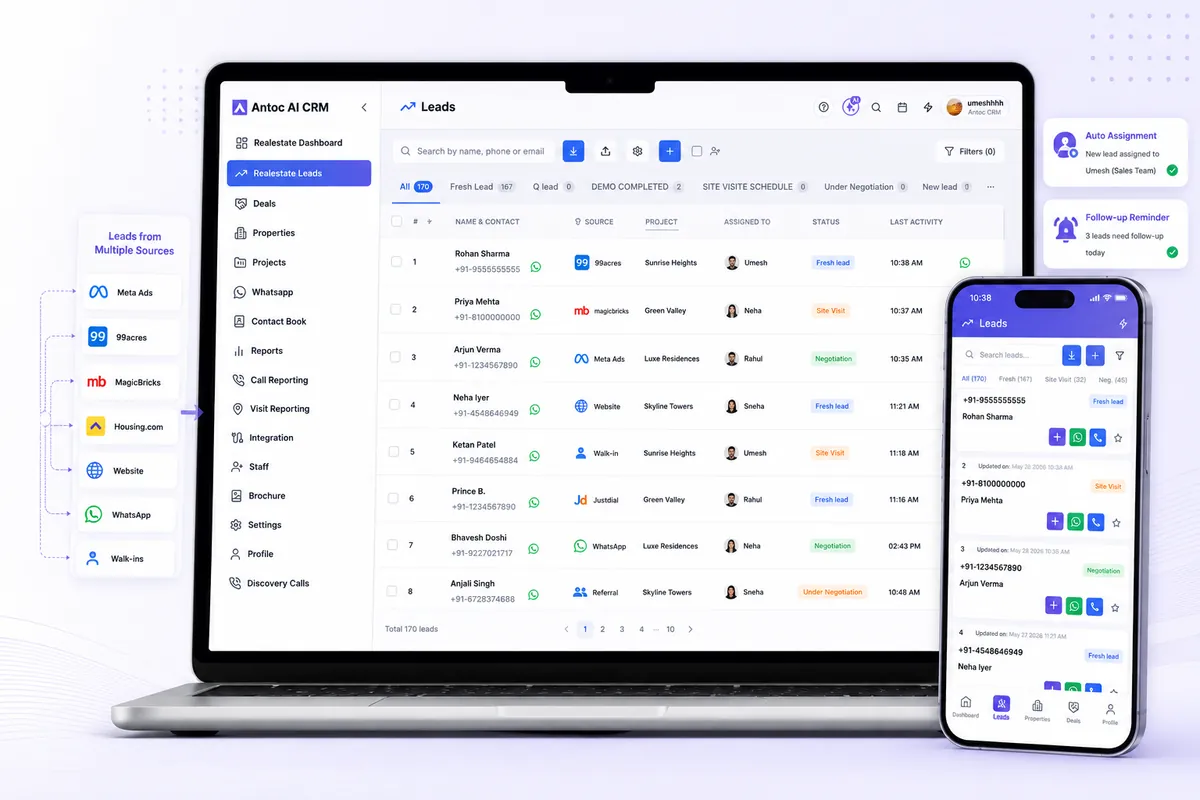
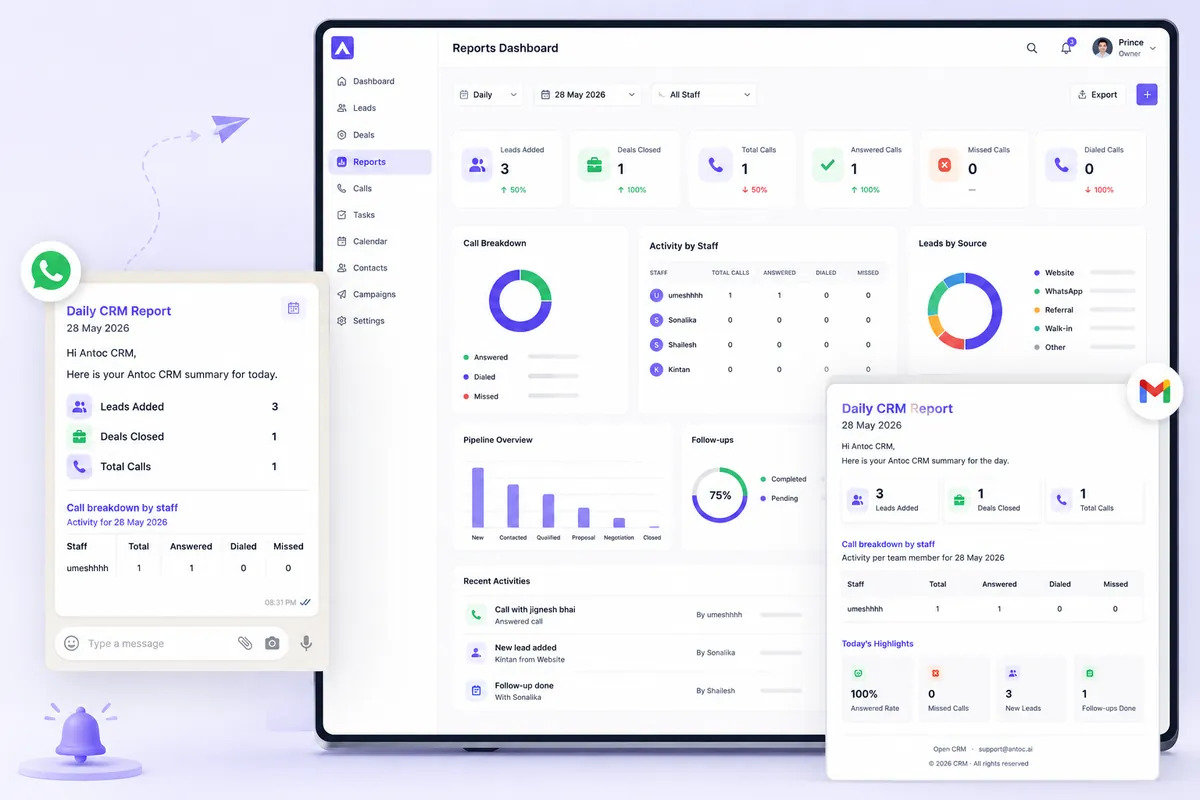
Agents get iOS and Android apps with one-tap call and WhatsApp. On Android, calls are logged automatically; iOS does not allow apps to read the phone call log, so iPhone users mark outcomes on the lead. Owners get a daily CRM report on WhatsApp and email with leads added, deals closed and calls by staff.
If you are comparing options, our guide to the best real estate CRM in India covers what to look for beyond price.
Common mistakes
- Importing a messy sheet as-is. Duplicates and mixed formats follow you into the CRM.
- Running Excel and the CRM in parallel for months. Two systems mean nobody trusts either.
- Importing leads without owners or follow-up dates. They disappear in the new system just like in the old one.
- Choosing a CRM without a good mobile app. Brokers live on their phones and at sites.
- Letting agents keep leads in personal WhatsApp. The history should belong to the business.
- Switching everything at once. Start with new leads and active pipeline; archive the dead rows.
- No owner for the rollout. One person should be responsible for data and training in the first month.
The decision in one line
If you work alone with a small lead list, keep Excel and keep it clean. If you have a team, multiple lead sources and follow-ups slipping, move to a CRM, migrate carefully, and use the best real estate CRM India guide to shortlist.
Read next


Frequently asked questions
Can I manage real estate leads in Excel?
Yes, if you work alone or with one partner and handle a modest number of active leads. Excel stores names, numbers and notes well. It struggles with automatic lead capture, reminders, call logging, multiple users editing at once and seeing who did what, which is why growing teams move to a CRM.
When should a real estate broker switch from Excel to a CRM?
Switch when more than two people work the same leads, when enquiries arrive from several portals and ads, when follow-ups are being missed, or when an agent leaving would take buyer history with them. If you spend time every day copying leads into the sheet, that is also a clear sign.
Is a CRM expensive compared to Excel?
Excel looks free, but missed follow-ups and wasted lead spend cost money. Real estate CRMs in India are usually priced per user per month. Antoc starts at ₹599 per user per month on annual billing. Compare that with the brokerage on a single deal lost through a missed call.
How do I move my Excel leads into a CRM?
Clean the sheet first: remove duplicates, fix phone number formats and standardise status values. Then map each column to a CRM field, import a small test batch, check it, import the rest, and assign an owner and next follow-up date to every lead. Ask your CRM vendor for its import template.
Can I keep using Excel alongside a CRM?
Use both for one week at most while the team gets used to the CRM, then stop updating the sheet. Two live systems create two versions of the truth. You can still export reports from the CRM to Excel when an owner or accountant prefers spreadsheets.
Will my agents actually use a CRM?
They will if it saves them effort on the phone. Look for a mobile app with one-tap calling and WhatsApp, automatic call logging where possible, and reminders that tell them who to call next. Make the CRM the only place where new leads appear, and adoption follows.
Bring one real lead source. We'll show you the floor.
Book a free demo and bring one source — Meta, 99acres or a CP WhatsApp group. We'll set it up on a lead in front of you.
We build Antoc for Indian brokers and developers, from Pasadi Technologies Pvt Ltd in Ahmedabad. These articles come from patterns we see on real sales floors.