On this page
Setting up the WhatsApp Business API for real estate needs five things: a verified Meta business portfolio, a dedicated phone number, an approved display name, approved message templates, and recorded buyer opt-in. Once live, your team messages buyers from one shared number with automated welcomes and broadcasts, and every chat is saved centrally.
This guide is for brokers, developers and sales heads in India who have outgrown a single phone running WhatsApp Business. It walks through each setup step, explains template categories and the 24-hour window, and shows where a CRM fits.
The WhatsApp Business API lets a real estate team message buyers from one shared, verified number with approved templates and automation. You need Meta business verification, a dedicated number, an approved display name, templates and recorded opt-in.
- Use the Business App for one person; use the API for a team.
- Complete Meta business verification early; it is usually the slowest step.
- Business-initiated messages need approved templates and recorded buyer opt-in.
- Meta charges by message category; check current India rates before budgeting.
WhatsApp Business App vs WhatsApp Business API
Most real estate teams start on the free Business App. It works well until more than one or two people need to talk to buyers from the same number.
| Point | WhatsApp Business App | WhatsApp Business API |
|---|---|---|
| Best for | Solo broker or very small team | Teams of agents, pre-sales and developers |
| Who can use the number | Owner plus a limited number of linked devices | Many agents through a CRM or shared inbox |
| Automation | Basic greeting, away message, quick replies | Welcome on new lead, chatflows, triggered templates |
| Starting conversations | Manual messages from the phone | Approved templates only, after opt-in |
| Broadcasts | Broadcast lists, delivered only to contacts who saved your number | Template broadcasts to opted-in contacts |
| Chat history | On the phone | Stored centrally, can sit on the CRM lead |
| Cost | Free app | Meta charges by message category, plus provider or CRM fees |
| Setup | Download and register | Meta business verification, display name, templates |
The key difference for a sales team is ownership. On the App, chats live on whoever holds the phone. On the API, chats belong to the business and stay on the lead even when an agent leaves.
When a real estate team should move to the API
You are ready for the API if two or more of these are true:
- More than two people reply to buyers from the "office number".
- Leads from Meta ads or portals wait because nobody sees them on WhatsApp in time.
- You want an automatic welcome message the moment a lead arrives.
- You send project updates or launch messages to hundreds of contacts.
- Agents have left and taken buyer chats with them.
If you are a solo broker with a handful of enquiries a week, the Business App is still fine.
Want to see this on your own leads? Book a free Antoc demo.
Step-by-step WhatsApp Business API setup
Keep these ready before you begin: your business's legal name as it appears on official documents, a live website with matching business details, a business email, and a phone number you can dedicate to WhatsApp.
Step 1: Create or confirm your Meta business portfolio
Your Meta business portfolio (earlier called Business Manager) is the account that owns your WhatsApp setup, Facebook Page and ad accounts. Use the company's portfolio, with at least two admins, not an agent's personal profile.
Step 2: Complete Meta business verification
Meta asks you to verify that the business is real. In India, teams typically use official documents such as a GST registration certificate or incorporation certificate, with a name and address that match the website. Check Meta's Business Help Centre for the currently accepted documents.
Start this first. It is usually the step that takes longest, and a name mismatch between documents and website is a common reason for delays.
Step 3: Choose how you will access the API
You reach the API through Meta's platform directly, through a Business Solution Provider, or through a CRM that works with the official API. For a sales team, a CRM connection is usually the most practical, because chats then sit on the lead next to calls and follow-ups.
Step 4: Register the phone number
Pick a number you can dedicate to WhatsApp and that can receive a verification code by SMS or call. A landline or a new mobile number both work. If the number already runs on the WhatsApp App, ask your provider how Meta currently handles migration before you switch, and back up chats first.
Step 5: Set the display name
The display name is what buyers see. It should clearly match your business or brand, for example "Sharma Realty" rather than "Best Flats Pune". Meta reviews display names, and names that do not relate to the business can be rejected.
Step 6: Create and submit message templates
Templates are pre-approved messages used to start conversations. Write them for your main moments: new lead welcome, site visit confirmation, visit reminder, payment reminder and project updates. More on categories below.
Step 7: Set up opt-in on every lead source
Add clear consent wording to Meta lead forms, website forms and walk-in registers, and record when and where each buyer opted in. Our guide to WhatsApp opt-in for real estate has sample wording.
Step 8: Connect automation and test
Switch on the welcome message for new leads, connect templates to triggers, and test with team members' numbers before going live.
Template categories explained
Meta classifies templates into categories, and the category affects both approval and charges. Choose the honest category; Meta can re-categorise templates that do not match.
| Category | Used for | Real estate example |
|---|---|---|
| Utility | Updates about an existing enquiry, visit or transaction | "Hi Amit, your site visit at Riverside Towers is confirmed for Saturday, 11 am." |
| Marketing | Promotions, launches, offers, re-engaging cold leads | "New 2 BHK homes at ₹68 lakh in Gota, Ahmedabad. Book a weekend visit." |
| Authentication | One-time passwords for logins | Buyer portal login codes, if you run one |
Free-form replies inside the 24-hour window, when the buyer has messaged you, are handled separately from templates. For a ready set of approved-style messages, see these WhatsApp templates for property brokers.
The 24-hour customer service window
When a buyer sends you a WhatsApp message, a 24-hour window opens from their latest message. Inside it, agents can reply freely: answer questions, send photos, share a brochure.
Once the window closes, you can only restart the conversation with an approved template. In practice this means:
- Reply to incoming buyer messages quickly, while the window is open and the buyer is engaged.
- Ask the next question inside the window, such as visit day and time, so the conversation keeps moving.
- Keep utility templates ready for confirmations and reminders after the window closes.
- Use marketing templates sparingly, only for buyers who opted in and match the project.
What WhatsApp Business API costs
There are two parts. First, Meta charges for messages based on category (marketing, utility, authentication), and it has changed its pricing model and rates over time. Check Meta's current WhatsApp pricing for India before you budget; do not rely on old rate cards.
Second, your provider or CRM charges its own subscription, and some providers add a markup on Meta's charges. Ask for this in writing.
Illustrative planning example (₹): a Surat broker team of 5 agents plans 2 marketing broadcasts a month to 1,500 opted-in contacts, plus utility reminders for about 120 site visits. That is 3,000 marketing messages and roughly 240 utility messages a month (a confirmation and a reminder per visit). Multiply each by Meta's current India rate for that category to get the messaging budget. The CRM is a separate line: Antoc plans start at ₹599 per user per month on annual billing, so 5 users on Basic would be ₹2,995 a month before messaging and taxes.
What real estate teams use the API for once live
Start with a few high-value flows rather than switching everything on at once.
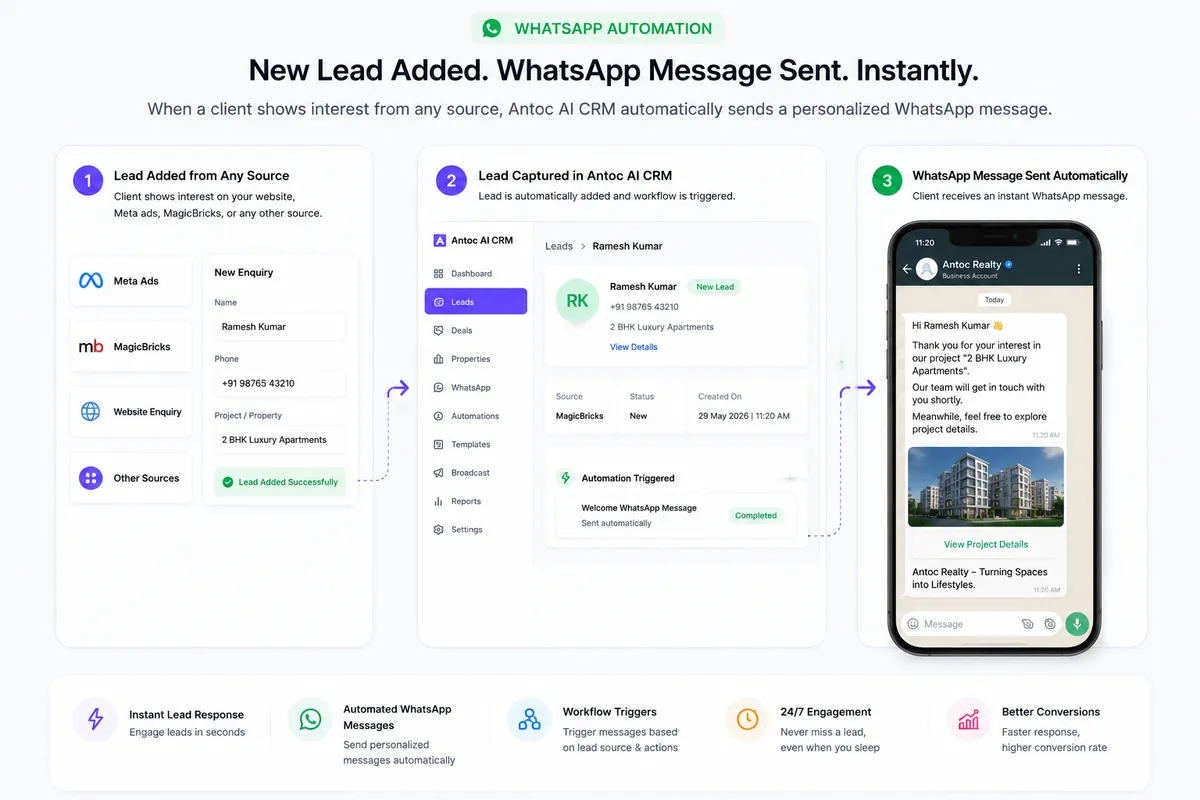
New lead welcome
The moment a portal, Meta or website lead arrives, the buyer gets a short message with the agent's name and the project. This bridges the gap until the first call.
Site visit confirmation and reminder
A utility template confirms the visit with date, time and location, and a second reminder goes out on the morning of the visit. This reduces wasted trips for your site team.
Brochure and property sharing
Inside the 24-hour window, agents share floor plans, photos and price sheets in the chat, and the history stays on the lead for the next agent or manager.
Launch and project update broadcasts
Marketing templates go to opted-in buyers who match the project's budget and location. Segment first; sending a ₹3 crore villa launch to a ₹50 lakh 2 BHK list only earns blocks.
Qualification chatflows
A simple flow asks budget, BHK, location and timeline, then hands the buyer to an agent. Keep it short, and always offer "talk to a person".
Post-sale reminders for developers
Payment reminders, demand notices and possession updates go to booked buyers as utility messages, so the conversation continues after the booking.
Quality rating and messaging limits
Meta monitors how buyers react to your messages. If many people block or report your number, its quality rating drops and your sending can be restricted.
New numbers also start with a limit on how many people you can message through business-initiated conversations in a day, which can increase as you send good-quality messages. Check Meta's documentation for the current tiers. The simple rule: message only opted-in buyers about properties that match what they asked for.
Running the API inside a real estate CRM
The API on its own is just a pipe. The value comes when WhatsApp is connected to your leads, so every chat sits next to the source, the agent, the calls and the next follow-up. That is what a WhatsApp CRM for real estate does.
In Antoc, WhatsApp automation runs on the official Meta WhatsApp API where enabled: a welcome message when a new lead arrives, templates, broadcasts, chatflows and a shared inbox, with chats saved on the lead timeline.
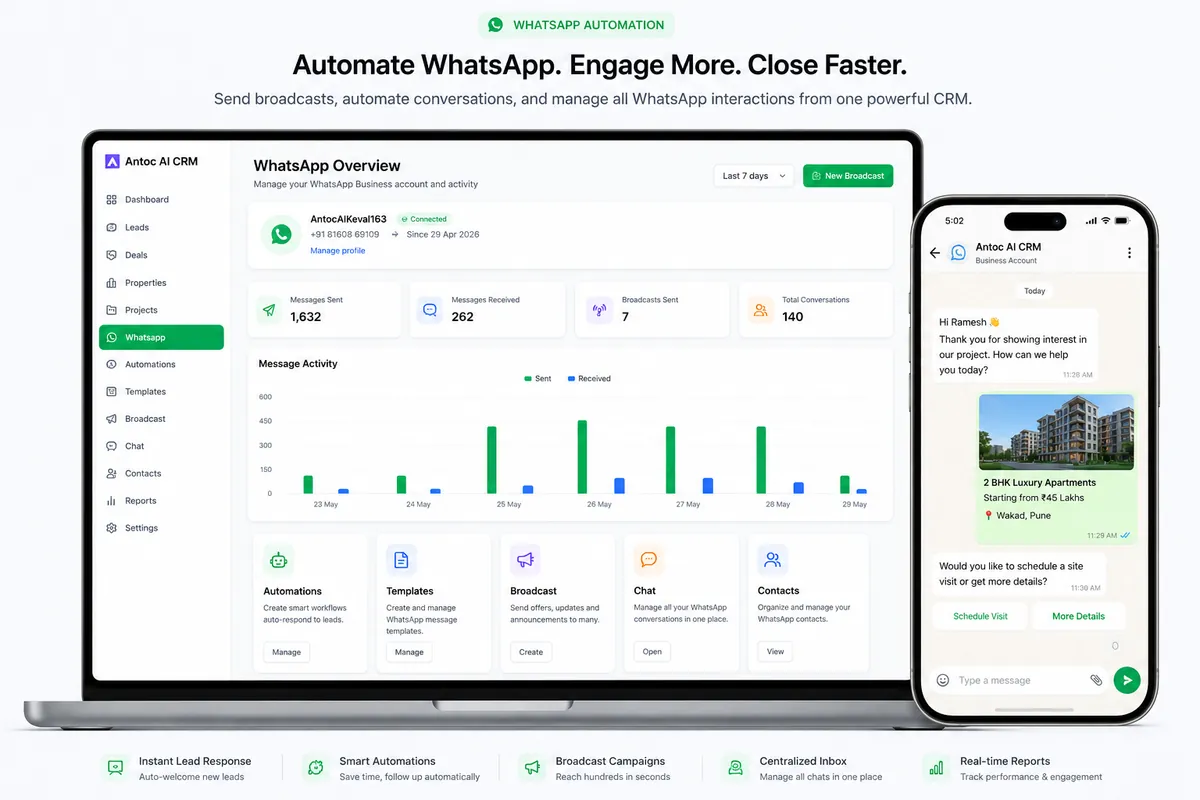
Agents can also open WhatsApp with one tap from the lead list, so personal-number chats stop being the default.
Common mistakes
- Starting with a personal or agent's number. Use a business number the company controls.
- Leaving business verification to the end. It is often the slowest step; start it first.
- Mismatched business details. Legal name, website and documents should match exactly.
- Labelling promotions as utility. Meta can re-categorise or reject mismatched templates.
- Broadcasting to bought or old contact lists. No opt-in means blocks, reports and a falling quality rating.
- Ignoring the 24-hour window. Slow replies force you into templates for what could have been a simple chat.
- Budgeting from an old rate card. Meta's pricing changes; check current rates for India.
Your next step
Start Meta business verification this week, list the five templates your team needs most, and add opt-in wording to every lead form. Then connect the number to a WhatsApp CRM built for real estate teams so every buyer conversation stays with the business.
Read next
Frequently asked questions
What is the difference between WhatsApp Business App and API?
The Business App is a free phone app for one business user with a few linked devices and manual messaging. The API is for teams: one number used by many agents through a CRM or provider, with approved templates, automation, broadcasts to opted-in contacts and chat history saved centrally. The API has per-message charges set by Meta.
How long does WhatsApp Business API setup take?
It depends mainly on Meta business verification and display name review, which vary case by case. Keep your business documents, website and phone number ready before you start, so the setup itself goes quickly once verification is approved. Template approvals can also take some time, so submit them early.
Can I use my existing WhatsApp number for the API?
Often yes, but the number has to be registered on the API platform, and the rules for continuing to use it in the WhatsApp Business App have changed over time. Ask your CRM or provider what Meta currently supports before migrating, and back up important chats first.
How much does WhatsApp Business API cost in India?
Meta charges based on the message or conversation category, such as marketing, utility or authentication, and the model and rates are updated from time to time. Check Meta's current pricing for India. Your provider or CRM subscription is a separate cost, and some providers add a markup on Meta's charges.
What is the WhatsApp 24-hour window?
When a buyer messages your business, you can reply with normal free-form messages for 24 hours from their last message. After that window closes, you can only start a conversation with an approved template. This is why fast replies to incoming WhatsApp enquiries matter so much.
Do I need customer opt-in to send WhatsApp messages?
Yes. Meta's policy requires that people agree to receive messages from your business before you send business-initiated messages. Collect opt-in on your lead forms, website and walk-in forms, record when and where it was given, and read Meta's current WhatsApp Business messaging policy for details.
Bring one real lead source. We'll show you the floor.
Book a free demo and bring one source — Meta, 99acres or a CP WhatsApp group. We'll set it up on a lead in front of you.
We build Antoc for Indian brokers and developers, from Pasadi Technologies Pvt Ltd in Ahmedabad. These articles come from patterns we see on real sales floors.