On this page
A mobile CRM for real estate puts your lead list, reminders, property inventory and call tools on the phone a field agent already carries. Agents can call or WhatsApp a buyer in one tap, update a site visit from the project gate, and share a matching property before the buyer has even driven away.
This guide is for brokers and sales managers whose agents spend most of the day at sites, society offices and in traffic, and whose CRM is mostly opened on an office laptop, if at all.
Field agents spend their day at sites and in cars, not at desks. A mobile CRM lets them call or WhatsApp in one tap, update visits on the spot, get reminders with sound and share properties, while calls on Android are logged automatically.
- Field agents need the CRM on their phone, not a laptop at the office.
- 1-click call and WhatsApp remove the copy-paste step that slows responses.
- Log every site visit outcome from the phone before leaving the site.
- Android allows automatic call logging; iPhone users must log outcomes manually.
Why desk-first CRMs fail field agents
Real estate is a field job. A typical agent's day is two site visits in the morning, a resale viewing after lunch, a society office visit for an NOC and calls from the car in between. The laptop stays in the office.
So agents do what works on the phone: save leads as contacts, scribble notes on WhatsApp, and plan to "update the CRM in the evening". By evening, they are tired. By the next morning, the details of three visits have blurred into one.
The result is a CRM that is always a day behind. The manager can't see what happened at Saturday's visits until Monday. The buyer who asked for a corner unit gets sent the wrong floor plan. And when the agent leaves, the real history leaves with their phone.
A mobile CRM fixes this by making the phone the place where work is recorded, not just where calls are made.
What field agents actually do on the phone
Here is how common field situations play out with and without a mobile CRM:
| Field situation | Without a mobile CRM | With a mobile CRM |
|---|---|---|
| New lead arrives during a visit | Agent sees it hours later on a sheet | Assignment alert with sound on the phone |
| Calling a lead | Copy number from Excel, dial manually | 1-click call from the lead card |
| Sending details on WhatsApp | Save contact first, then type | 1-click WhatsApp from the lead card |
| After a site visit | Notes in memory or a notebook | Outcome and next date logged at the site |
| Buyer asks for alternatives | "I'll send options tonight" | Share a matching property on WhatsApp there and then |
| Follow-up due | Agent remembers, or doesn't | Reminder with sound at the set time |
| Manager wants an update | Calls the agent | Sees the updated lead in the CRM |
Want to see this on your own leads? Book a free Antoc demo.
A site visit day, step by step
This is the routine a field agent can run entirely from the phone:
- Morning check. Open today's reminders: site visits, follow-ups due and overdue tasks.
- Confirm visits. 1-click call or WhatsApp each buyer to confirm the time and share the location pin.
- Arrive and check in on the lead. Open the lead card at the site so the buyer's budget, preferences and past notes are in front of you.
- Show the property. If the buyer wants alternatives, find matching properties in the app and share them on WhatsApp before they leave.
- Log the outcome before leaving. Mark the visit done, note what the buyer liked and disliked, update the stage and set the next follow-up date.
- Between visits. Respond to new lead alerts with a 1-click call or WhatsApp from the car (or at the next stop, if you're driving).
- Evening close. Clear today's reminders. Every lead touched today should have a next date.
Step 5 is where most teams lose deals. Ask agents to finish it before they start the car. It takes a minute and saves the follow-up.
1-click call and WhatsApp: speed without mistakes
Response speed matters most when the agent is away from a desk. A new enquiry lands while they are at a site, and the faster they reach the buyer, the better the chance of a visit.
In Antoc's mobile app, every lead in the list has a call button and a WhatsApp button. One tap starts the call or opens the chat with that number, without saving a contact. On Android, the call is logged against the lead automatically. See how the 1-click dialer works on web and mobile.
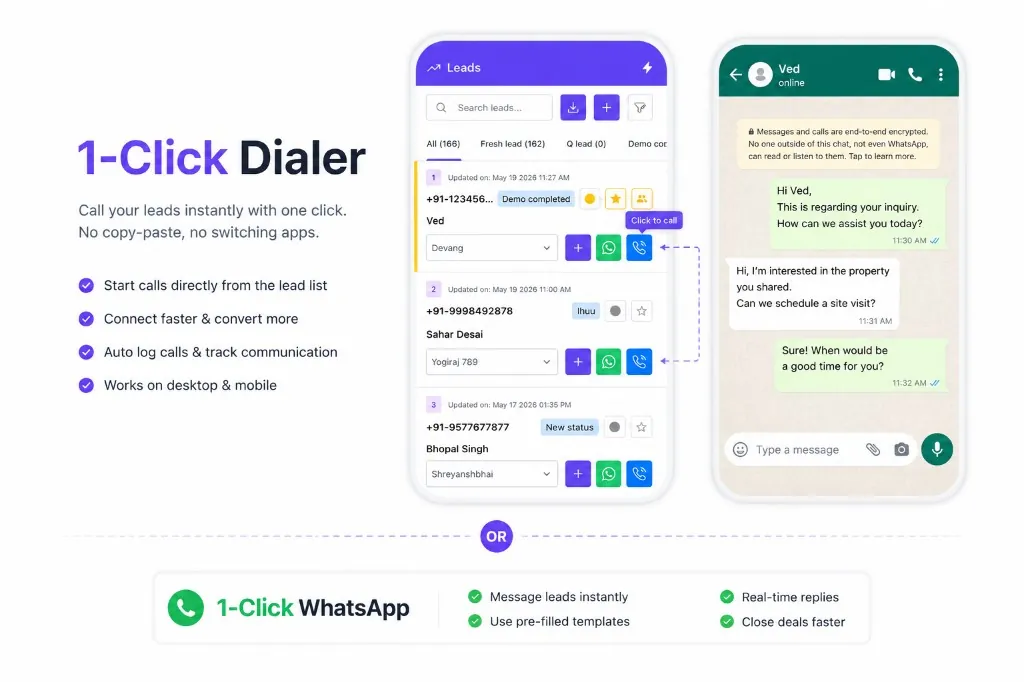
This also removes a quiet source of errors: the wrong number dialled from a sheet, or a WhatsApp sent to a saved contact with the same first name.
Reminders that make a sound
A reminder that sits silently in an app is easy to miss in traffic or at a busy site. Field agents need alerts they actually notice.
Antoc sends reminders on web and mobile for new lead assignments, follow-ups, site visits, property hold expiry and overdue follow-ups, with custom sounds. An agent can tell a new-lead alert from a follow-up reminder without looking at the screen.
Set the follow-up time when you log each call or visit. The phone then becomes the to-do list, instead of the agent's memory.
Sharing properties from the phone
Buyers rarely like the first flat they see. The agent who can show two more options on the spot keeps the buyer engaged. The agent who says "I'll send something tonight" often loses them to another broker by morning.
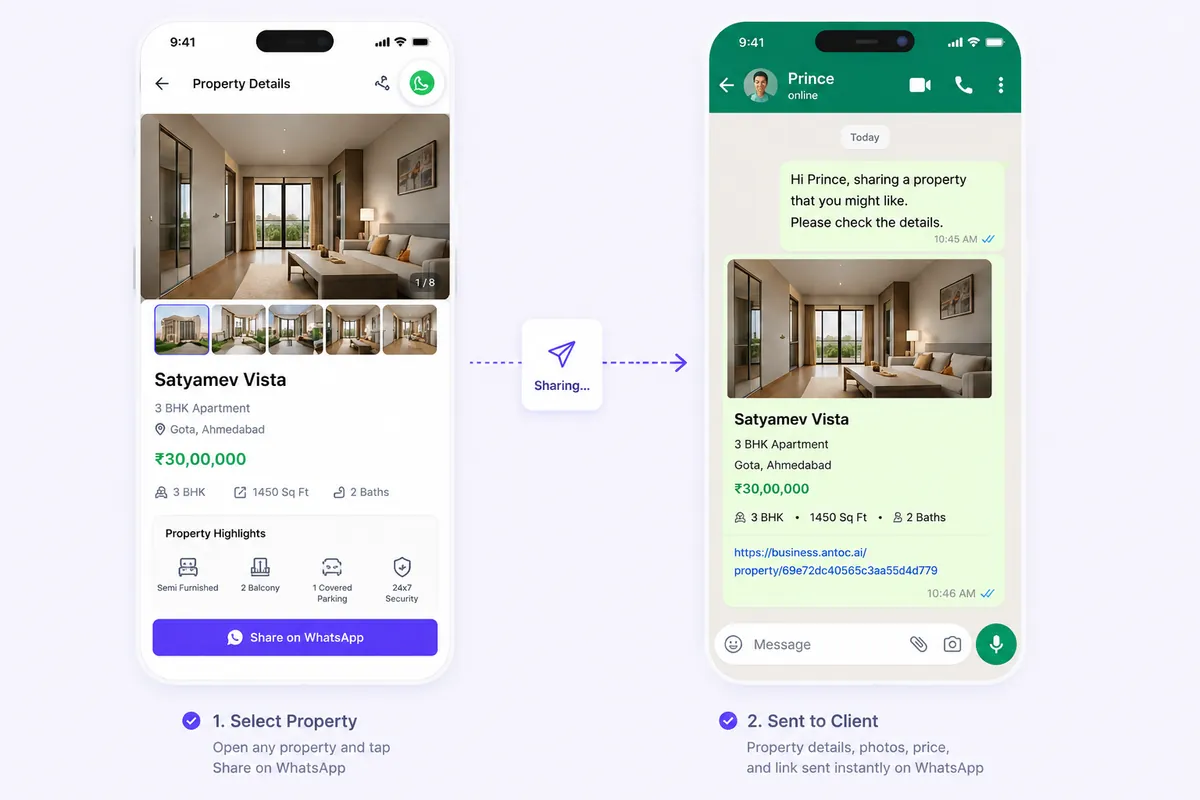
When properties are in the CRM with price, type and status, the agent can match them to a lead's requirement and share them in seconds. No hunting through gallery photos or old WhatsApp forwards.
Adding walk-ins and on-the-spot leads
Not every lead comes from a portal or an ad. A family walks into the sample flat. A neighbour of your seller asks about prices. Someone calls the number on a "For Sale" board while you're at the site.
These leads are usually the warmest you get, and the most likely to be lost, because they live only in the agent's head or call history. Add them to the CRM from the phone right away: name, number, requirement, budget and a source such as "walk-in" or "signboard". From that moment they get the same reminders and follow-ups as any other lead.
Tagging the source properly also tells you later which sites, boards or open houses actually bring buyers.
What the sales manager gains
A mobile CRM is not only for agents. It changes how a manager runs the team:
- Same-day visibility. Visit outcomes are logged at the site, so Saturday's results are visible on Saturday, not Monday.
- Fewer status calls. No more 9 pm calls asking "what happened with the Sharma visit?" The answer is on the lead.
- Cleaner reassignment. When an agent is on leave or busy on a launch, the manager can move leads with full history attached.
- A daily summary without chasing. Antoc's daily CRM report on WhatsApp and email shows leads added, deals closed and calls with a staff breakdown.
- Protection when people leave. Leads, notes and history stay in the CRM, not in a former employee's phone.
Android vs iPhone: what call logging can and can't do
This is the one area where the phone itself sets the limits, not the CRM.
| Capability | Android | iPhone |
|---|---|---|
| 1-click call and WhatsApp from the lead | Yes | Yes |
| Automatic logging of regular phone calls | Yes, Antoc logs calls automatically | No, iOS does not allow apps to read the phone call log |
| Calls in the daily call report | Logged automatically | Depends on agents adding outcomes manually |
| Reminders and property sharing | Yes | Yes |
If call reports matter to you, decide your policy upfront. Some teams give call-heavy roles Android phones. Others accept iPhones and make manual outcome logging part of the day close. Either works if the rule is clear. Our guide to call tracking for real estate teams covers this in more detail.
Illustrative example: what a mobile CRM costs vs one lost deal
Illustrative example. Use your own team size, deal values and phone costs.
A Bengaluru broker has 8 field agents. On Antoc's Prime plan at ₹699 per user per month (annual), the team costs ₹5,592 a month. On Basic at ₹599, it is ₹4,792.
Now the other side. One resale deal on a ₹90 lakh flat at 1% brokerage from one side is ₹90,000. If one site visit a month goes cold because nobody logged the buyer's feedback or followed up on time, that single deal would pay for about 16 months of Prime for all 8 agents.
If the owner decides to give four call-heavy agents company Android phones at, say, ₹12,000 each, that is a one-time ₹48,000. Compare that against the value of complete call reports for the whole year.
What to check in a mobile CRM app
Before you choose, test these on your own phone with your own leads:
- Lead list, search and filters work smoothly on a basic phone, not just a flagship
- 1-click call and WhatsApp from the lead card
- Reminders with sound for new leads, follow-ups and site visits
- Updating stage, notes and next follow-up in a few taps
- Property list with matching and WhatsApp sharing
- What the app logs on Android and what it can't do on iPhone
- Web and mobile showing the same data in real time
For a full buyer's checklist across features, pricing and support, read our guide to the best real estate CRM in India. If you run a small team, our list of what to look for in the best CRM for real estate brokers in India focuses on 2 to 20 agent teams.
Common mistakes
- Rolling out the app without a day-close rule. Agents install it and keep working from WhatsApp.
- Logging visits the next day. Details fade and the follow-up window closes.
- Ignoring the iPhone limitation. Managers expect call reports that iPhones can't produce automatically.
- Turning off notification sounds. Silent reminders get missed in the field.
- Keeping property details only in the gallery. Agents can't match or share fast without inventory in the CRM.
- Saving leads as personal contacts. When the agent leaves, the leads leave with the phone.
- Testing the app only on the owner's phone. Try it on the phones your agents actually use.
Getting your field team started
Start with one week: every agent installs the app, works the lead list from the phone and logs every visit before leaving the site. At the end of the week, compare how many visits have same-day outcomes with the week before.
When you're comparing options, use the criteria in our guide to choosing the best real estate CRM in India and test them with your own agents in the field, not in a conference room.
Read next
Frequently asked questions
What is a mobile CRM for real estate?
It is a CRM app on Android or iPhone that gives agents their lead list, follow-up reminders, property inventory and call tools on the phone. Agents can call or WhatsApp leads in one tap, update a lead after a site visit, share property details and see what is due today, without going back to the office.
Does Antoc have a mobile app?
Yes. Antoc has apps for both iOS and Android. Agents get the lead list with 1-click calling and WhatsApp, reminders with notification sounds, and property management with sharing on WhatsApp. On Android, Antoc logs calls automatically. On iPhone, Apple does not allow apps to read the phone call log.
Can a real estate CRM app record calls on iPhone?
iOS does not allow third-party apps to read the phone's call log, so no CRM app can automatically log regular phone calls on an iPhone the way it can on Android. iPhone users should add call outcomes manually after each call. Ask any vendor to show exactly what their iOS app captures in a live demo.
Why do field agents need 1-click calling and WhatsApp?
Field agents call between visits, in cars and at project gates. Copying a number from a sheet into the dialer or saving a contact before WhatsApp wastes time and causes mistakes. One tap from the lead card starts the call or chat, and the activity stays linked to the right lead for the manager to see.
How should agents update site visits in a mobile CRM?
Before leaving the site, the agent marks the visit as done, notes what the buyer liked and disliked, updates the stage and sets the next follow-up date. This takes a minute on the phone and gives the manager same-day visibility. Waiting till evening or the next day usually means details are forgotten.
Is a mobile CRM enough without a web version?
Field agents can work almost entirely on mobile, but managers and back-office teams usually need the web version for reports, bulk work, inventory updates and settings. Choose a CRM where web and mobile show the same data in real time, so a lead updated on the phone is visible on the manager's screen immediately.
Bring one real lead source. We'll show you the floor.
Book a free demo and bring one source — Meta, 99acres or a CP WhatsApp group. We'll set it up on a lead in front of you.
We build Antoc for Indian brokers and developers, from Pasadi Technologies Pvt Ltd in Ahmedabad. These articles come from patterns we see on real sales floors.